
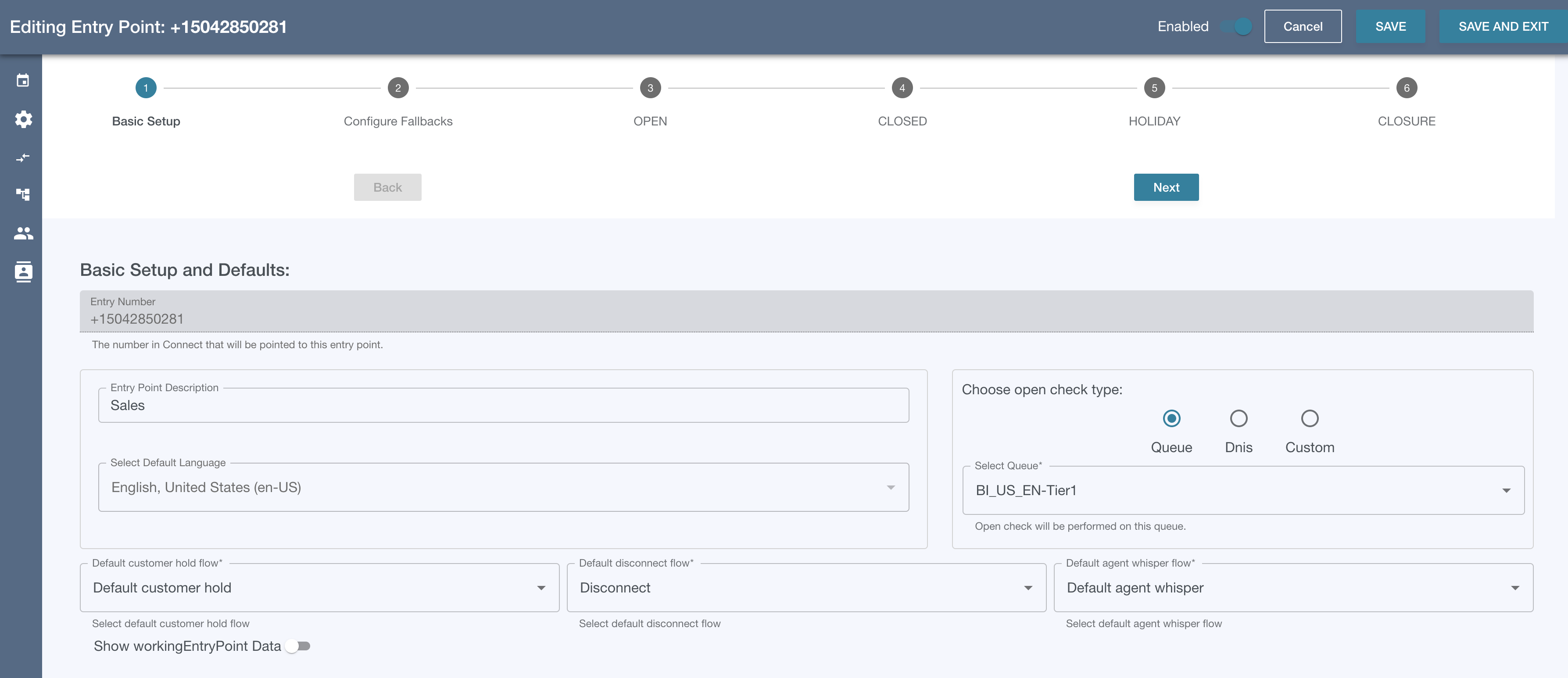
Step 1.1 - Select Connect Phone Number
-
The numbers in the dropdown are all numbers in Connect that are not currently being used in another entry point configuration.
-
Note: At the time of writing this documentation (April 2023), the numbers in the dropdown are not guaranteed to be pointing to the VF_DEFAULT_ENTRY_ENGINE_FLOW. Be sure that any numbers you want to use in Entry Point Management point to VF_DEFAULT_ENTRY_ENGINE_FLOW in Connect’s phone number management.
Step 1.2 - Set the Default Language
-
The default language will determine the language of all the prompts used in the Entry Flow. It cannot be changed once the entry point data is saved.
Step 1.3 - Choose an Open Check Type
-
Available Open Check Value-Types Are:
-
Queue Name
-
DNIS
-
Custom - defined in Calendar Management
-
-
Open Check Status
-
If the Queue Name, DNIS, or Custom value is associated to a set of hours, a holiday, or a closure in Calendar Management, the openCheck lambda will return one of four states:
-
OPEN
-
CLOSED
-
HOLIDAY
-
CLOSURE
-
-
-
Step 1.4 - Choose Flows
Set the Default Customer Hold, Disconnect and Agent Whisper Flows.
Our basic setup has been configured and it’s time to move to Step 2 - Configure Fallbacks